
Sometimes, the hardest part about getting stuff done is simply remembering what you have to do — and when.
And ironically, lots of the tools that exist to help us juggle our endless array of incoming tasks only seem to make it even more overwhelming. Truly, it doesn’t take much for the very act of managing your tasks — or maybe even just figuring out the best way to do it — to become a chore in and of itself.
Like many perpetually perplexed plebeians, I’ve exerted far too much energy on the impossible-seeming task of finding a system for tracking tasks that (a) actually works — and (b) doesn’t feel like a burden of its own. I’ve gone through more tasks and reminders systems than any sane person should ever encounter in a lifetime.
And lemme tell ya: At long last, I’ve encountered one that’s the perfect blend of simplicity and power.
It’s a brand new, off-the-beaten-path Android app you probably haven’t heard of but that absolutely should be on your radar. It’s both easier and more effective to use than most of the big-name tasks apps out there right now — and it almost, dare I say, even makes managing your to-dos enjoyable instead of exhausting.
Lemme show ya how it works.
[Keep the knowledge coming with my free Android Intelligence newsletter — three new things to try every Friday and my Android Notification Power-Pack as a special welcome bonus!]
A new gold standard for Android reminders
My fellow memory-challenged marsupial, allow me to introduce you to the amusingly named Ruff Reminders.
Ruff Reminders is an Android-first creation that’s only been in the Play Store for a matter of hours now — though I’ve had the opportunity to use it during its development for the past couple of months, as it’s progressed from a, well, rough framework into a polished and well-rounded place for storing all of your tasks both personal and professional and ensuring you never forget anything.
If the Ruff name sounds familiar, by the way, you might be thinking of the similarly themed Ruff Writing app — which puts a simple scrolling scratchpad right on your home screen for on-the-fly thought storing. I’ve featured it as one of my must-have Android widgets for some time now.
Ruff Reminders comes from the same source — an indie Android app developer named Bardi Golriz — and it exists as a perfect companion to its sibling’s scratchpad concept.
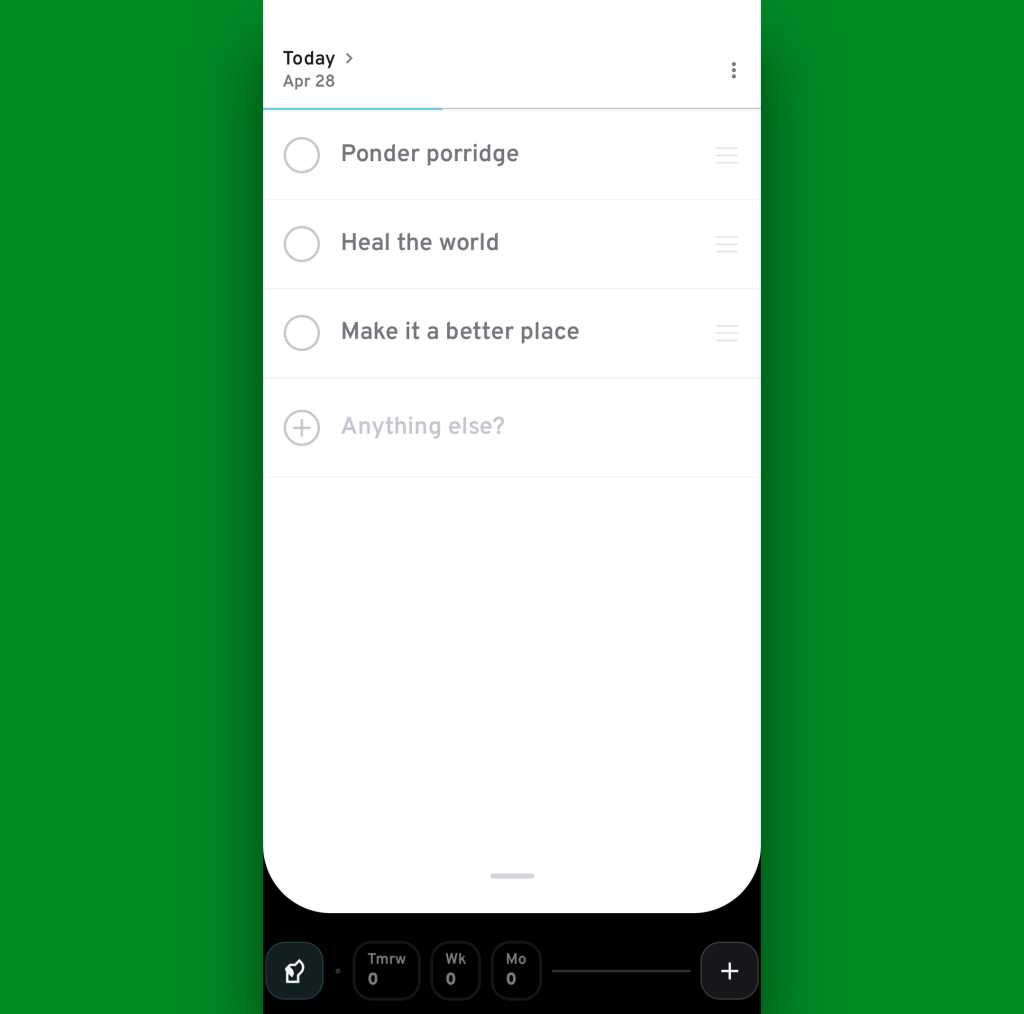
So let’s get into it: When you first open up Ruff Reminders, you’re greeted with a simple screen showing you the current day and a prompt to add any new reminders you need into the mix. The idea is that your focus belongs on the here and now — and starting with what you need to do today is the best way to actually get your tasks accomplished.
JR Raphael, Foundry
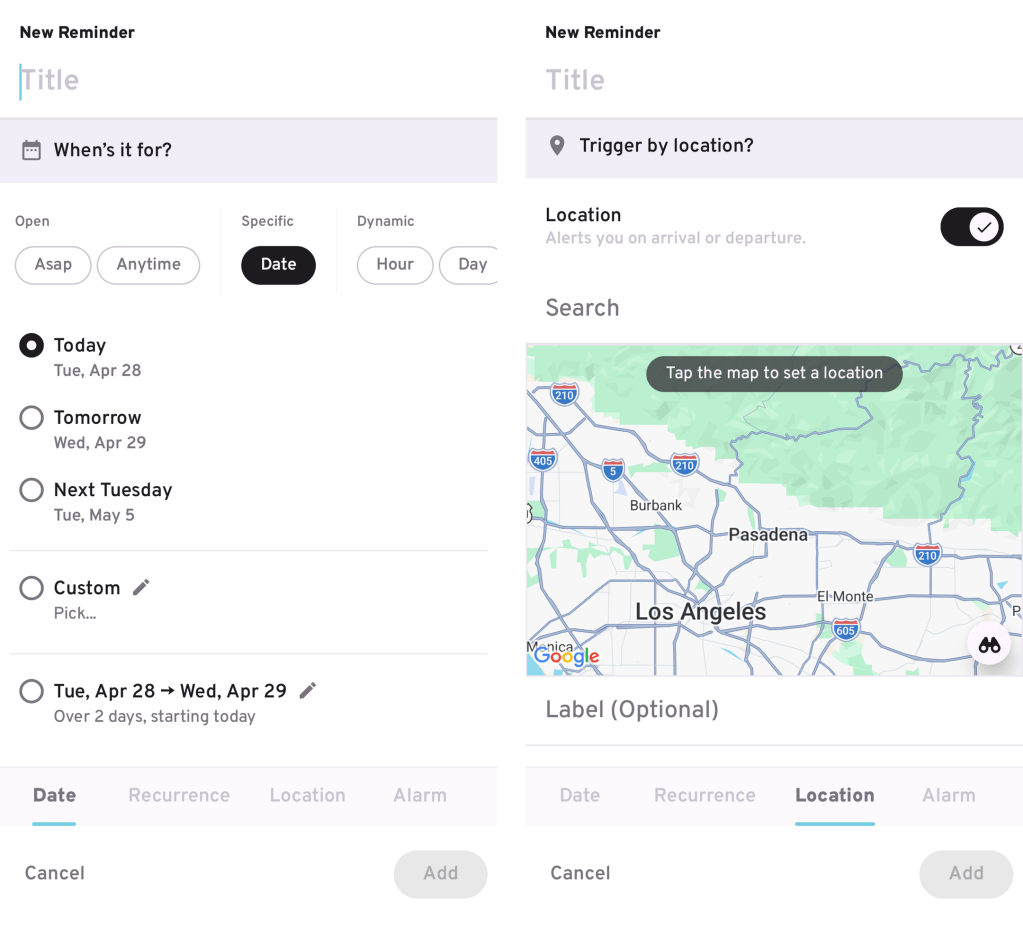
Creating a new task is as easy as tapping the “quick entry” prompt toward the top of the screen and typing. You can also use the plus icon in the lower-right corner of the screen for a more elaborate and detail-oriented task creation mechanism — and that’s where some of Ruff Reminders’ most impressive powers come into play.
To wit: For any task you create, you can schedule yourself a reminder for…
- A specific date and time
- A dynamic date or time — as in every Monday, every weekend, the first day of each month, and so on
- And (drumroll, please…) a specific location — if, say, you want to be reminded about something when you get to the office, when you get home, or maybe even when you walk into a particular store or business
JR Raphael, Foundry
That last one in particular is a true treat to see. Like many Android-appreciating animals, I’ve been irked by Google’s ongoing retirement of location-based reminders all across the platform — first within the old Google Assistant system and then more recently within Google Keep as well. Ruff Reminders handily fills that void while offering a whole lot of other enticing extras that Assistant and Keep never provided.
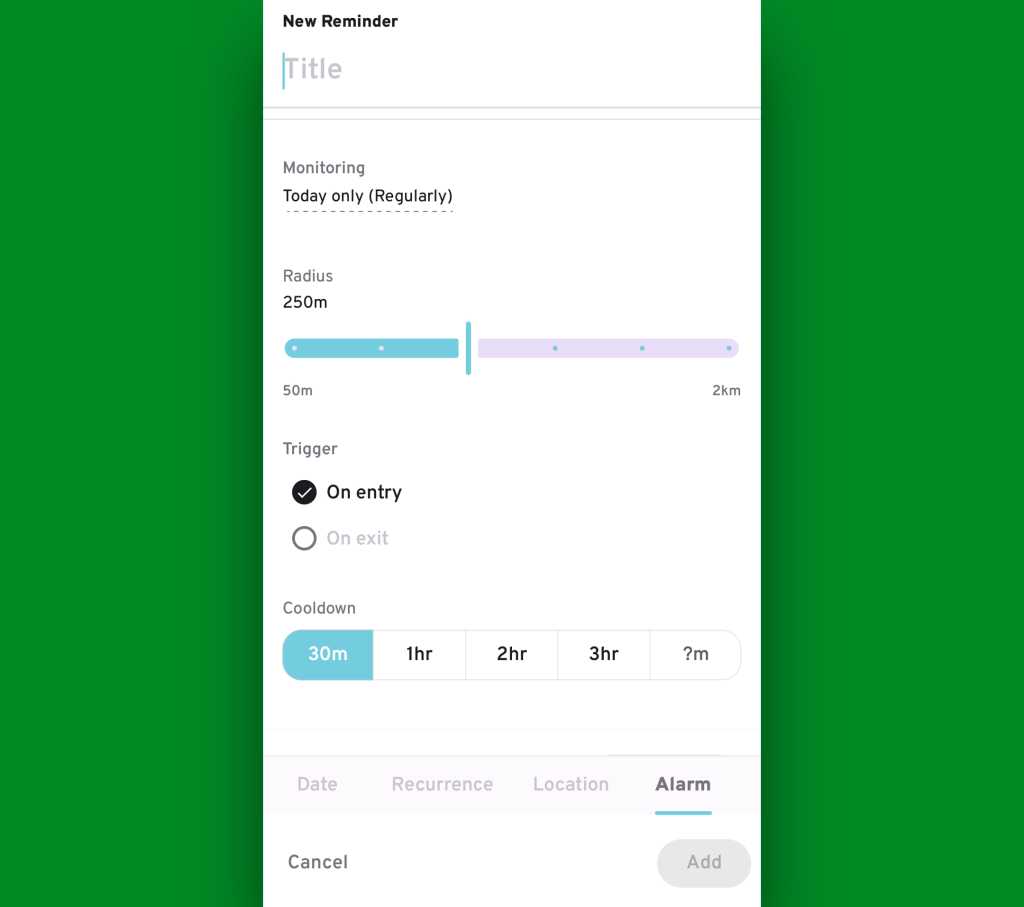
For instance: For any location-based reminder, Ruff Reminders gives you the option to have a task pop up when you reach whatever location you specify either within a certain specific timeframe or anytime — and to have that reminder exist only once or as a recurring thing, every time you come or go from the location in question.
On that latter point, you can also set the reminder to trigger when you arrive at your chosen location or when you leave it — and you can choose exactly how wide of a radius the app uses to identify the spot — both of which add a whole other layer of flexibility and potential usefulness into the feature.
JR Raphael, Foundry
And all of that is still just the start.
Remembering — and beyond
Once you have tasks created, Ruff Reminders really does work to make sure you remember ’em. In addition to setting all of your own preferred reminder patterns for each new task you create, you can tell the app to always nudge you about still-pending tasks for the present day at specific times as well as to keep “chasing” you with more prominent alarms — even multiple alarms, if you want — for items you haven’t finished.
All of those options exist within the dog-shaped Ruff icon in the lower-left corner of the screen:
JR Raphael, Foundry
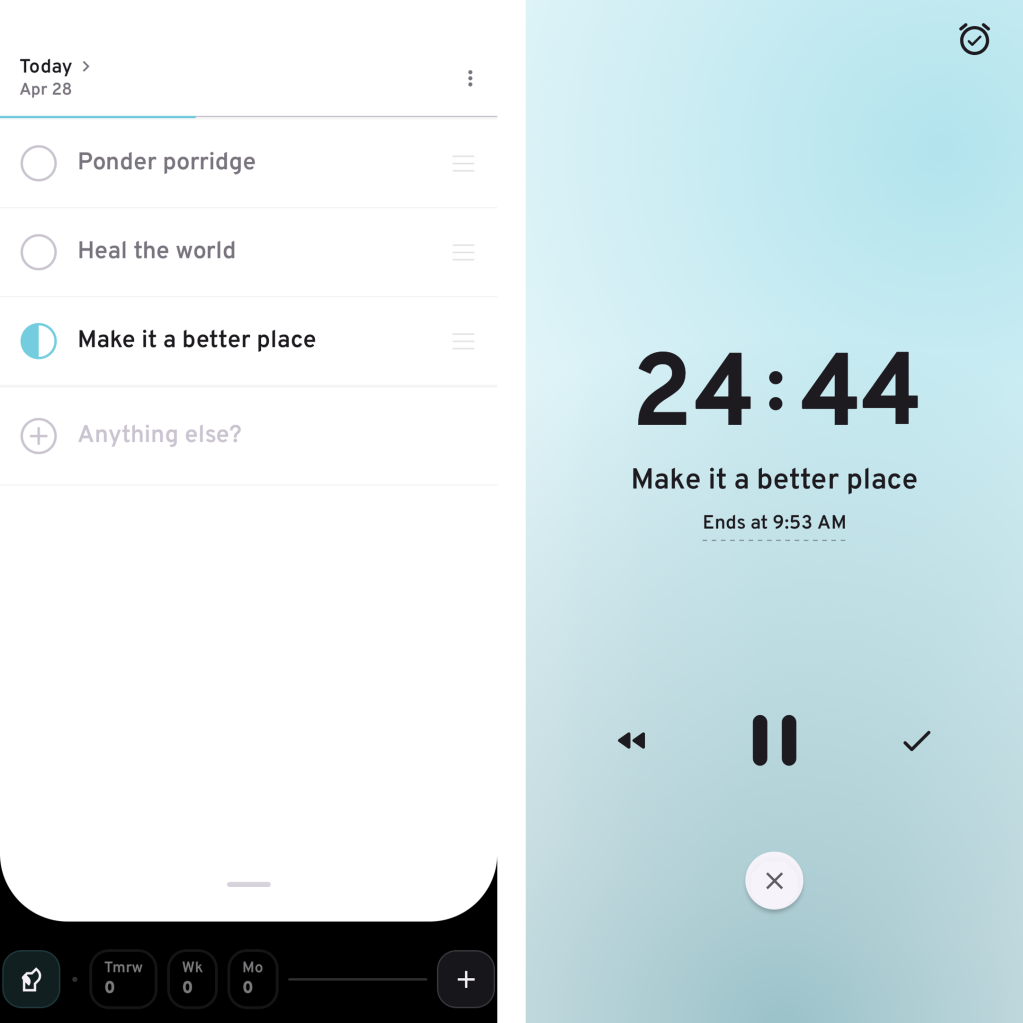
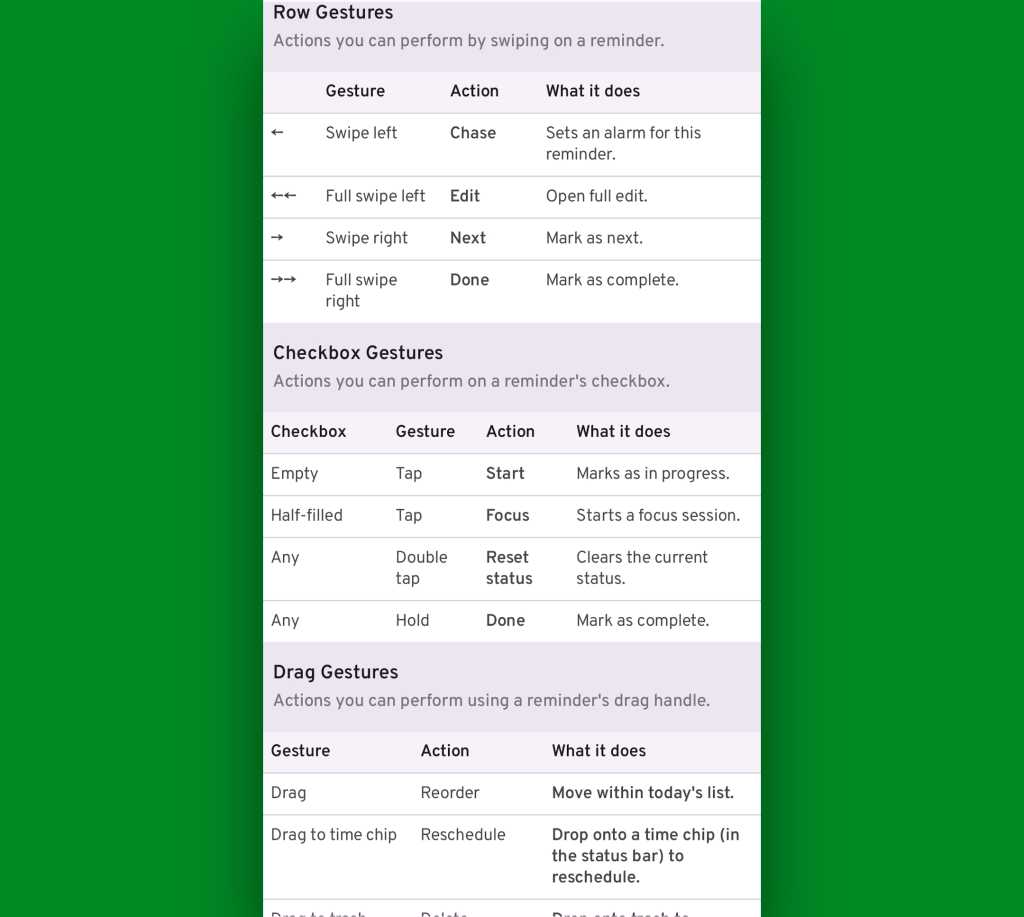
Once you’ve started a task, one tap on its line tells Ruff Reminders that it’s in progress and marks it accordingly. Another tap starts a full-screen timer (for any length you choose) to help you actually focus on the task. And pressing and holding the task marks it as finished.
You can also double-tap to reset an item’s status, if such a need ever arises.
JR Raphael, Foundry
If something does still manage to slip by without getting completed, it’ll move down to the app’s command bar, at the bottom of the screen — where it shows up inside a red box with the number of unfinished past tasks front and center.

JR Raphael, Foundry
You can always tap that box to revisit and reschedule any missed tasks — or you can find any past task via the app’s swipe-up-from-the-bottom search system. But even more helpful are the ongoing reminders the app will keep bringing front and center whenever you tell it to keep chasing you about any particular item.

JR Raphael, Foundry
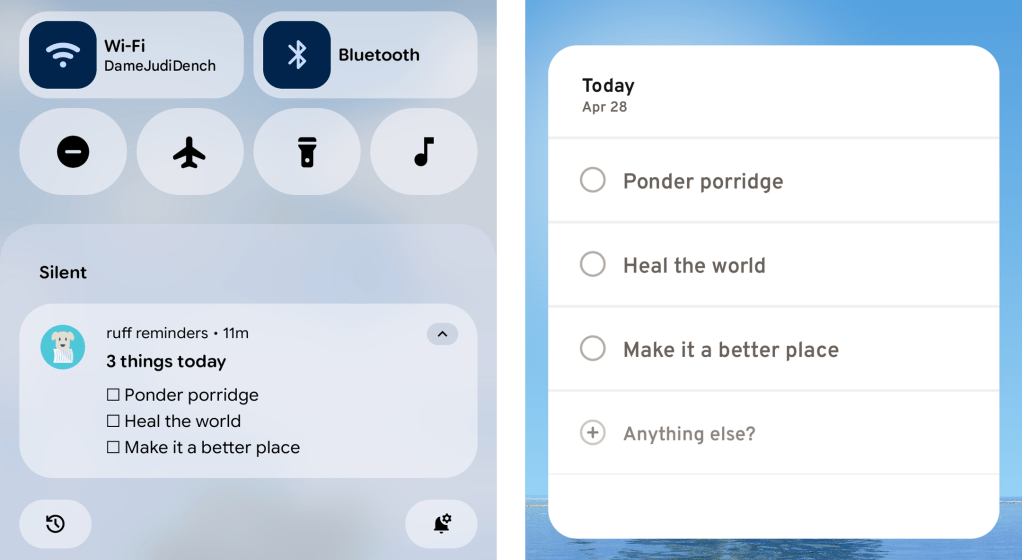
What else? Let’s see — for any items you set as “ongoing,” Ruff will create a persistent notification so you can easily see what’s lingering on your list. And as you’d expect for any serious Android productivity app, Ruff Reminders has a widget that lets you look at all your tasks for the current day and add new tasks right then and there, on your home screen, without ever having to open anything up.
JR Raphael, Foundry
For the true productivity-obsessed power-user nerds among us, Ruff Reminders also has a whole host of step-saving gestures built into its interface. Like all of the app’s more advanced options, you absolutely don’t have to mess with ’em if you don’t want to — but if you’re the type of person who likes learning shortcuts and flying around your phone with taps and swipes, you’ll be delighted by all the possibilities this unlocks.
The more you use it, the more thoughtful and useful little touches you keep discovering — again, if and only if you want to explore those types of options.
JR Raphael, Foundry
What’s most interesting to me about Ruff Reminders is the space it fills between the everything-style, intensive-need to-do apps out there — things like Todoist or even all-purpose productivity tools like Notion, which are great for the right type of purpose and person but can be overwhelming overkill for more casual task tracking — and the super-simple, at times too-limited apps like Google Keep, which are fine for basic info-dumping but lacking in more powerful task management and reminder magic.
Ruff Reminders manages to be both simple and effective — an often overlooked middle-ground for those of us who want to track tasks and remember stuff in a way that goes beyond the most barebones basic approach but that doesn’t require an entire intricate platform to do it.
Oh, and as far as privacy goes, Ruff Reminder’s policy on that front is also refreshingly simple: It doesn’t collect or process any personally identifiable information. Period.
The app doesn’t have ads, either. Instead, it allows you to use its most fundamental setup for free and offers a paid subscription for its full set of features — three bucks a month or $20 per year, at the moment, with the latter price set to bump up to $30 after a while. (That pricing does also vary by country, so the rates will be slightly lower in certain parts of the world.)
For now, all you’ve gotta do is try it out and see if it works as well for you as it has been for me.
And if you need a helping hand to remind you, I know just the app to get the job done.
Increase your Android intelligence quotient with my free Android Intelligence newsletter — three new things to try every Friday and my free Android Notification Power-Pack today.