
When it comes to Android security, we’ve got three main types of threats to contend with as informed phone-owners determined to keep our data safe.
First, there are the theft-related worries — the breaches that happen when someone physically takes possession of your device and manages to get past its virtual gates. (Setting up Android’s native theft protection options and enabling all the right Android security settings in advance makes a massive difference in terms of proactive protection.)
Next, there are the many, many theoretical threats played up by companies hoping to sell you over-the-top security software. (Choosing a device that actually gets timely and reliable software updates and then maintaining a teensy shred of common sense is generally all that’s needed to keep these overhyped boogeymen at bay.)
And finally, every single one of us faces the most worrisome threats of all — the ones related to good old-fashioned trickery and our own occasional lapses in judgment. From phishing to smishing and vishing and now even quishing (I swear I’m not making these up), there’s no shortage of shenanigans trying to trick us into willingly giving up our information without even realizing it. And all the easily accessible AI these days only makes matters worse.
Suffice it to say, that last category is generally the most pressing — ’cause it’s our own very human shortcomings that make it possible. And even the most savvy and cautious creatures among us can be convinced to click a thoroughly cloaked questionable link in the right moment.
With that kind of threat, your best bet is simply having as many layers of protection as possible in front of you — so if your own guard is ever down and a particularly convincing scam attempt appears in front of you, there’ll be something standing between it and you that says: “Hey buddy: You sure you want to do this?”
That’s precisely what’s popping up as an easily overlooked new option on Android right now — in one of the places where you’re most likely to encounter scam attempts on your phone. And as a smart and sensible Android Intelligence reader, you don’t have to wait for Google to officially give it to you to start embracing its power.
[Get level-headed knowledge in your inbox with my free Android Intelligence newsletter — a single useful new tip every Friday.]
Hello, Enhanced Protection
The arena at the center of our attention this week is none other than texting and the de facto default Google Messages app for Android.
Google Messages has long had a simple spam protection option among its many buried features, but Google’s in the midst of expanding that to include an even meatier Enhanced Protection mode for all of your incoming messages.
Specifically, Enhanced Protection includes three new forms of in-message scam defense:
- An AI-powered analysis that puts messages from new, unknown senders under an especially strong microscope to seek out signs of “novel and sophisticated attacks” — a trend that Google says increasingly gets hidden within “slow-burn conversations” designed to get you to give up innocuous-seeming but potentially problematic slivers of personal info along the way.
- An even stronger form of link scanning that looks at real-time signals to see if any link you’ve received contains scammy elements or signs of phishing within — even if the site itself isn’t immediately known to be shady.
- More prominent warnings anytime you’re about to open a link from a potentially questionable sender — to confirm you actually want to proceed and make sure you didn’t tap something inadvertently.
All these new features work from a privacy-first perspective, according to Google, with either on-device processing or cloud-based computing that occurs only in an encrypted, secure dedicated space that makes all the related info inaccessible to anyone else (including even Google itself).
The Messages Enhanced Protection options are available for anyone to opt into as of this moment — but, as is so often the case with these kinds of updates, it’s up to you to realize they’re available and then take the steps to activate ’em on any device(s) you’re using.
Your 3-step Android security upgrade
If you want to step up your Android messaging protection this instant, you need to manually apply a couple of pertinent under-the-hood updates that’ll enable all the new options and let you activate ’em without any delay or potential for forgetting.
1️⃣ First, bump yourself up to the beta version of the Google Messages app. This gives you early access to incoming features like these before they reach everyone and lets you skip the line of uncertain waiting. Joining an app’s beta channel is completely free and takes about a minute to do. Just follow these instructions, if you aren’t already familiar with the process, then move on our next step.
2️⃣ Once you’re in the Google Messages beta channel and with the latest available app version in front of you, we need to update a typically invisible Android element called Google Play Services to make sure you’re on the most recent version of that as well. Google Play Services powers a lot of important processes and works hand in hand with apps like Messages to make certain features, including this new Enhanced Protection option, available.
To manually apply the latest Google Play Services update, head into your system settings and search for the word play. Find the item in the results labeled “Google Play system update” — then tap it, tap the line that says “Google Play system update” on the screen that comes up next, and wait for the system to find and apply any available updates. You’ll probably be prompted to restart your device after any updates are made.
Now take a deep breath: You’ve got all the related elements up to date and ready, and all that’s left is to find and opt in to the actual Messages Enhanced Protection feature.
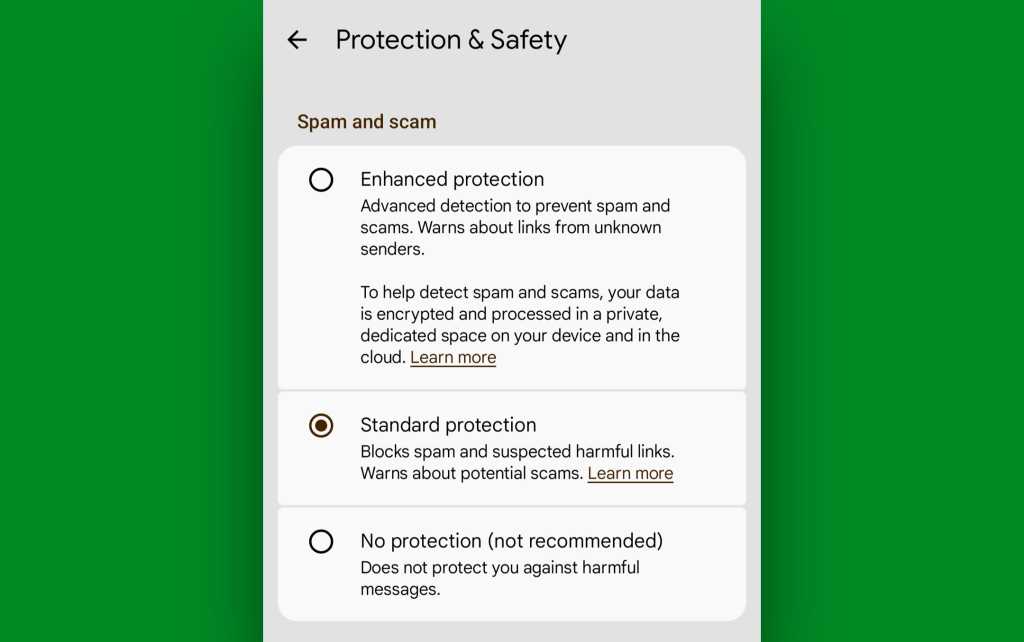
3️⃣ This last step is especially easy: Just open up the Google Messages app, tap your profile picture in its upper-right corner, and select “Messages settings.” Find and tap “Protection & Safety” in the settings menu that shows up next, and you should then see the newly expanded series of options in front of you.
JR Raphael, Foundry
Tap “Enhanced Protection” to select it, and that’s it: You’re now opted in to the full new Enhanced Protection option for all of your incoming texting activity.
All that’s left is to keep your common sense defenses up and rest a little easier knowing that if your own judgment ever falters — even just for a second — you’ve got another layer of protection in place to fall back on and help you avoid falling into a truly troubling trap.
Keep the helpful knowledge coming with my free Android Intelligence newsletter — one useful new thing to try every Friday and my Android Notification Power-Pack as an instant welcome bonus.